Stellar now offers two routes for recovering mailbox data from a corrupt or unmountable Exchange database: a browser-based service for smaller, one-off jobs and a full desktop application for larger, sensitive, or more complex recovery projects. We tested both workflows to see where each fits.
A damaged Exchange Database (EDB) can quickly become an operational emergency. A database may remain in a Dirty Shutdown state after an unexpected outage, fail to mount because transaction logs are missing, or become inaccessible following storage corruption. The preferred response is still to preserve an untouched copy of the database and logs, check for a healthy Database Availability Group copy or verified backup, and use Microsoft-supported recovery methods where possible. A Recovery Database, for example, can mount a restored database and use New-MailboxRestoreRequest to return data to production.
Stellar’s repair products become particularly useful when those paths are unavailable, unsuccessful, or too cumbersome for the immediate task. Rather than attempting to put the only damaged database back into service, they scan an offline EDB, reconstruct recoverable mailbox content, and export that content to a usable destination. The online and desktop products share this basic purpose, but their scale, privacy model, controls, and output options are very different.
One Recovery Platform, Two Ways to Use It
Free Online Exchange Repair by Stellar is the low-friction option. It runs in a current web browser, requires no Exchange Server or Outlook installation, and handles one uploaded EDB per recovery session. The Free plan supports files up to 500 MB, while Premium raises the ceiling to 5 GB. After processing, Stellar says users can preview the recovered mailbox structure and download a ZIP containing a separate PST for each mailbox.
Stellar Repair for Exchange is the more capable local application. It has no stated EDB-size limit, can be used for repeated recovery jobs, offers Quick and Extensive scanning, and exposes mailbox-level and item-level controls. Recovered data can be saved to PST and several individual-message formats or exported directly to Live Exchange and Microsoft 365.
| Area | Online service | Desktop software |
|---|---|---|
| Processing | Uploaded and processed online | Processed locally on Windows |
| EDB limit | 500 MB Free; 5 GB Premium | No stated size limit |
| Recovery control | Automated workflow and mailbox preview | Two scan modes, granular preview, search, filtering, and selection |
| Output | Individual PSTs in a ZIP | PST, MSG, EML, RTF, HTML, PDF, Live Exchange, and Microsoft 365 |
| Best fit | Approved small, occasional jobs | Large, sensitive, recurring, or advanced jobs |
Free Online Exchange Repair by Stellar: Recovery Without an Installation
The online workflow is deliberately simple. After signing in, the administrator selects an EDB and uploads it through the browser. In our test, the service accepted a 1,280 MB file called Corrupted1.edb. That size exceeds the 500 MB Free allowance but remains within the 5 GB Premium limit.
Once the upload completed, the page confirmed that the EDB had been received and presented a prominent Start Repair button. This separation is useful because it gives the administrator a final checkpoint before cloud processing begins.

The next screen displayed live repair progress. Stellar describes the process as automated and read-only, meaning the uploaded source is not modified. The company says the service can recover emails, attachments, contacts, calendars, tasks, notes, journals, and the original folder hierarchy. It also says completed mailboxes can be previewed before download.

We followed the online test through upload and active repair processing, but did not independently open and validate the final PST files. Stellar states that completed results are supplied as a ZIP with a separate PST for each recovered mailbox. That makes the service easy to understand, although it is less flexible than the desktop edition: there is no choice of scan mode, no direct Live Exchange or Microsoft 365 export, and no support beyond 5 GB.
Its main attraction is proportionality. An administrator dealing with a small, isolated EDB does not necessarily need to prepare a recovery workstation or buy a reusable desktop license. The browser route reduces the operation to upload, repair, preview, and download.
Stellar Repair for Exchange: Deeper Recovery Under Local Control
The Windows application follows a more traditional administrator-led workflow. Its start screen lets users browse directly to an EDB or search a drive or folder when the database location is uncertain. A temporary-file path can also be selected, which matters when processing a large database on a system drive with limited free space.

After selecting the database, Stellar offers Quick Scan and Extensive Scan. Quick Scan is the logical first pass for common corruption and is designed to finish sooner. Extensive Scan performs a deeper analysis for severely damaged databases, with a corresponding time cost. Presenting the choice in plain language makes the application approachable without hiding the technical trade-off.

Our scan reconstructed multiple mailboxes in a familiar navigation tree. Administrators can expand individual mailboxes, inspect folders, and choose entire mailboxes or narrower subsets for recovery. This is a major advantage over a fully automated service when only a few users or folders are relevant to an incident.

Selecting a folder opens a message list with fields such as sender, recipient, subject, and date. A selected item can then be previewed in detail, including its body and attachments. This scan-before-purchase model is useful: the trial can analyze an EDB and show what appears recoverable before a license is needed to save or export the data.

Search, Deleted Items, and Reusable Scan Results
The desktop product goes well beyond mailbox browsing. Its Find Message feature can search by sender, recipient, CC, subject, body text, attachment name, importance, item type, and date. Searches can use any selected criterion or require an exact match, making the tool useful for targeted recovery and smaller eDiscovery-style tasks.

Stellar also exposes Recoverable Items structures that are normally less visible than standard mailbox folders. Depending on what remains in the EDB, administrators can include areas such as Deletions, Purges, Versions, Calendar Logging, Audit Logging, Substrate Hold, and eDiscovery Hold. This is valuable when the required material was deleted or retained outside the normal folder tree, although availability ultimately depends on the condition and contents of the source database.

Long scans do not have to be repeated unnecessarily. The Save Scan function stores scan information for later loading, which is especially practical with large EDBs or an Extensive Scan. An administrator can perform analysis, review the reconstructed data, close the application, and resume the selection or export stage later.

Export Options and Administration Features
After previewing the results, users can save whole mailboxes, selected folders, or individual items. PST is the most obvious destination for offline validation in Outlook, while MSG, EML, RTF, HTML, and PDF are useful when only specific messages are needed. Direct export to Live Exchange or Microsoft 365 avoids an intermediate PST stage in restoration projects, though the target environment, permissions, mailbox mapping, and authentication still need to be prepared correctly.
The application includes several features aimed at larger jobs. Stellar advertises parallel processing of up to eight mailboxes during PST, Live Exchange, or Microsoft 365 export. Mailbox priority can bring business-critical users to the front of the queue, while filters can exclude Junk and Deleted Items, apply date ranges, or omit messages from specified senders. Large PST output is automatically split when it exceeds 45 GB. Scan and export logs provide a record of the operation.
These controls make the desktop edition substantially more than a local copy of the web service. It is a recovery workspace for inspecting, prioritizing, and routing mailbox data according to the needs of the incident.
Performance and Data Handling
Stellar says online repairs usually complete in less than 15 minutes, but its own documentation correctly notes that duration depends on EDB size, corruption severity, and mailbox volume. Upload bandwidth is another unavoidable factor. For the desktop edition, storage speed, available memory, scan mode, and export destination can all affect elapsed time. The ability to export up to eight mailboxes concurrently should improve throughput on suitable hardware, but it should not be interpreted as a guaranteed eightfold speed increase.
The two products also create a clear governance choice. Stellar says online transfers use an encrypted connection and that uploaded and recovered data is automatically deleted within 24 hours on Free or 48 hours on Premium. Those safeguards are welcome, but an EDB can contain many users’ correspondence, attachments, calendars, contacts, and retained or deleted items. Administrators should therefore confirm that uploading it is permitted by organizational policy, contracts, and data-residency requirements.
For approved, non-sensitive, or lower-risk files, the online service offers considerable convenience. For confidential production databases, regulated workloads, legal material, or customers whose policies prohibit third-party uploading, local processing with the desktop application is the more conservative choice.
Pricing and Value
At the time of testing, the online Free plan handled one EDB up to 500 MB and kept preview and download access available for 24 hours. Premium cost $99.99 per file, raised the limit to 5 GB, and extended availability to 48 hours. The 1.28 GB file used in our workflow therefore represents a Premium-sized job.

The value decision is straightforward for occasional recovery. A small, policy-approved EDB can be processed free, while a one-off database below 5 GB may justify Premium more readily than a desktop purchase. The calculation changes for larger files or repeat work: per-file pricing becomes less attractive, and the online size ceiling becomes decisive.
The desktop plan screen showed Corporate at $399 with a one-year license and up to 100 mailboxes, Technician at $599 with a lifetime license and unlimited mailboxes, and the five-tool Exchange Toolkit at $999. Prices, taxes, currencies, and promotions can vary by region and publication date, so current checkout pricing should be verified.
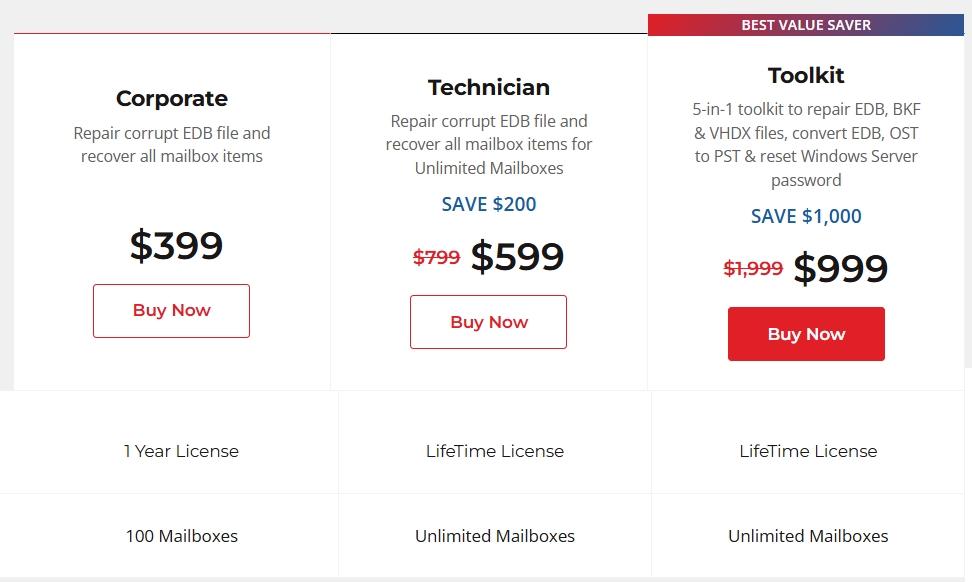
Corporate is the natural entry point for an organization handling a defined recovery. Technician is better aligned with MSPs and administrators expecting recurring work or higher mailbox counts. Toolkit makes sense when the additional Exchange backup extraction, EDB and OST conversion, and Windows Server password-recovery utilities would otherwise be purchased separately.
Notable Strengths
Free Online Exchange Repair by Stellar
- Requires only a browser, with no Exchange Server or Outlook installation.
- Offers a free route for EDB files up to 500 MB.
- Uses a clear upload, repair, preview, and download workflow.
- Leaves the source EDB unchanged and separates recovered mailboxes into PST files.
Stellar Repair for Exchange
- Keeps database processing local and has no stated EDB-size limit.
- Provides Quick and Extensive scans with granular mailbox and item previews.
- Adds detailed message search and Recoverable Items selection.
- Supports PST, message formats, Live Exchange, and Microsoft 365 destinations.
- Saves scan information and includes priority, filtering, logging, and parallel export controls.
Considerations
The online service requires the complete EDB to leave the administrator’s environment and is capped at 5 GB, so it is not a universal cloud replacement for the desktop software. It also focuses on PST delivery rather than direct restoration. The desktop edition requires a compatible 64-bit Windows system, sufficient local storage and memory, and a paid license before recovered data can be saved. Direct server exports add the normal complexity of credentials, permissions, target mailbox preparation, and Microsoft 365 authentication.
Neither route should be treated as a substitute for tested backups, DAG resilience, or a documented Exchange disaster-recovery plan. Recovery success also depends on what usable data remains in the EDB. In this evaluation, we verified the online upload and processing stages and the desktop scan, navigation, preview, search, Recoverable Items, and scan-saving workflow; we did not independently validate a final PST or server export.
Practical Use Cases
Small one-off incident: A sub-500 MB EDB from a lab, retired server, or approved low-risk environment is an ideal candidate for the free browser service. It minimizes preparation and provides a quick route to mailbox PSTs.
Mid-sized urgent recovery: For a single approved EDB between 500 MB and 5 GB, Premium can be the most proportionate option when an administrator needs PST output and does not require granular export controls.
Production or MSP recovery: Large databases, confidential customer data, recurring incidents, selective mailbox restoration, deleted-item investigation, and direct Live Exchange or Microsoft 365 export all favor Stellar Repair for Exchange.
Overall Assessment
Stellar has created a sensible two-level recovery offering. Online Exchange Repair removes much of the setup from small EDB recovery and makes the initial path unusually accessible: upload the database, start the automated repair, inspect the result, and download mailbox PSTs. Its free 500 MB tier is particularly useful for testing the service on a small database, while Premium fills the gap for one-off files up to 5 GB.
Stellar Repair for Exchange is the stronger tool when the incident demands control. Local processing, two scan modes, detailed previews, search, Recoverable Items, reusable scan results, broad export support, and mailbox-management features give administrators far more room to investigate and stage a recovery. Its ribbon interface keeps a technically complex task manageable without reducing it to a black box.
The best choice therefore depends less on which product is “better” than on the database and the organization handling it. For a small, policy-approved, occasional job, Free Online Exchange Repair by Stellar is the faster and more economical starting point. For larger, sensitive, complex, or repeated recovery work, Stellar Repair for Exchange is the clear recommendation. Together, they form a practical escalation path from immediate browser-based extraction to a full local Exchange recovery environment.