None of the following tools will crash a healthy, stable PC and that’s the whole point. You’ll want to run these knowing that they might take your system down so that you can proactively fix any problems now instead of having your PC go down mid-game or mid-render. I ran all five (I tried for six, but the full version of 3DMark was too pricey for this writer) stress tests on my MSI Cyborg 15 gaming laptop, and the results were pretty darn interesting. Here’s what each test does, and what a crash from each might tell you.
I kept HWiNFO (a temp measurement tool) open the whole time so I knew what my temps were doing while running the tests.
Prime95
The CPU torture test that’s been around since 1996
Prime95 began as a Mersenne prime search tool, but overclockers figured out that its torture tests are about as harsh a CPU workout as exists. You can download it for free from mersenne.org.
Launch it, select “Just Stress Testing,” and you’ll get three options. The Small FFTs test maximizes heat and power draw on your CPU cores, while the Large FFTs test stresses the memory controller and cache. Blend will test your RAM, too. The tool checks its output against known correct results, so an incorrect answer from your CPU will get flagged as an error right away.
On my Cyborg 15, Small FFTs pushed the CPU package to 86°C within minutes, then triggered thermal throttling. And then it force-quit entirely. That doesn’t mean my laptop is broken, but it’s a thin chassis hitting the cooling ceiling under max AVX load, which is what I wanted to learn during testing instead of mid-deadline on a heavy CPU job. For laptops, Blend is the more realistic choice, too, as it’s still punishing without the same heat wave. A desktop with a tower cooler won’t even notice Small FFTs.
y-cruncher
The AVX workload that finds errors Prime95 misses
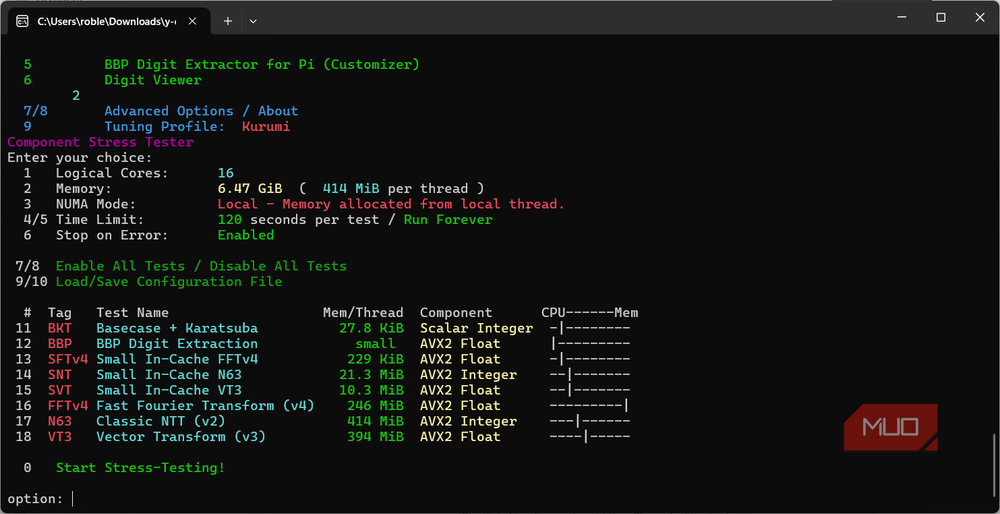
y-cruncher (lowercase on purpose) is a pi computation program from NumberWorld that’s free to download. It’s got a solid reputation in overclocking communities for crashing systems that pass all the other stability tests. It loads the CPU with AVX and AVX512 (Advanced Vector Extensions — a set of CPU instructions Intel and AMD added to their processors for doing math on big batches of numbers at once) instructions. It also hammers the memory subsystem, which can expose instabilities that Prime95 might miss.
The software author notes that there are confirmed cases of server hardware with ECC memory that fails under y-cruncher when no other tests could reproduce the error.
On my own Cyborg, y-cruncher crashed right away when I ran it after Prime95. The residual heat left no headroom for a second AVX-based test. If you’ve got a thermally limited machine, run y-cruncher first from a cold start. Also, launch it from a Terminal window instead of double-clicking the exe file, or the window will vanish when it’s done, not letting you see any results. If Prime95 passes and y-cruncher crashes your machine, there might be an issue with your memory timings or CPU voltage.
Karhu RAMTest
The RAM test that crashes Windows if your memory is bad
This tool runs inside Windows, using AVX and AVX2-optimized code paths to stress your memory under real operating conditions. If your RAM is unstable, Karhu will likely take your system down mid-test. That’s the point, though. A license costs around $10 (I purchased it for my own testing), and version 2.0 just came out with test customization and HWiNFO sensor integration.
One practical warning from my own run: use Karhu before any other stress tools, or reboot first. After Prime95 had pushed my virtual memory load to 97.9%, Karhu refused to start with a “paging file too small” error. A reboot cleared it immediately, though.
Once I had that clean start, my Cyborg laptop hit 2,251% coverage in under 12 minutes with no errors, which is a pass. The community standard is 200% coverage minimum, and a blue screen or hard reset before that means you have a real problem with your RAM, timings, or even an XMP profile that’s less stable than it should be.
FurMark
The GPU burner
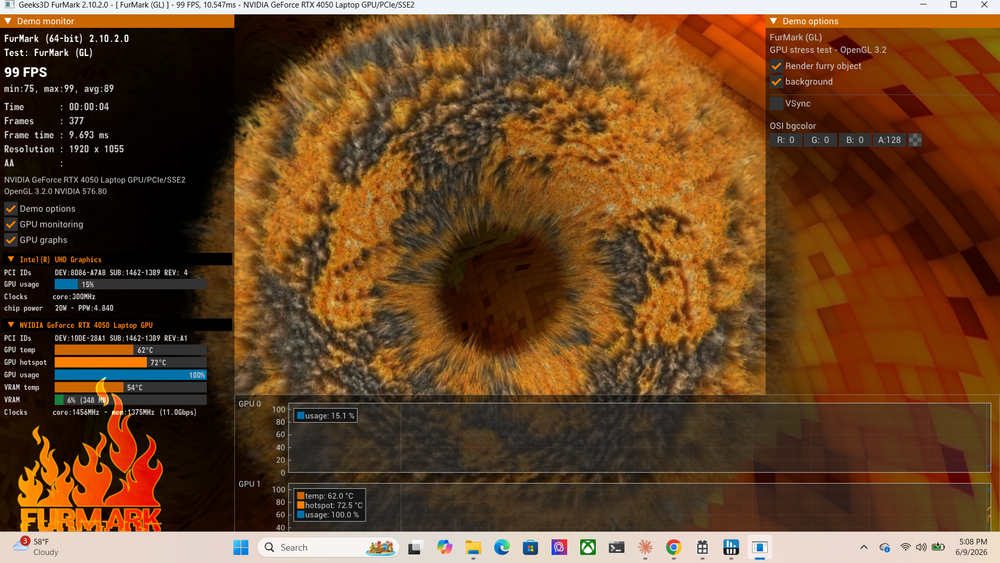
FurMark earns its “power virus” nickname by generating a sustained maximum-load OpenGL or Vulkan workload using fur rendering algorithms, which pushes your GPU to the thermal edge. You can get it free from geeks3d.com. Version 2.10.2 (October 2025) supports everything from the RTX 5000 and Radeon RX 9000 series down to older cards.
I had to select my discrete GPU in the Vulkan GPUs dropdown before running, since it defaulted to the integrated Intel chip.
My RTX 4050 stabilized at 76˚C with an 88˚C hotspot at full load, holding a steady 1,440MHz core clock with zero artifacts across ten minutes. The hotspot was only 1˚C over the card’s 87˚C limit, but the clocks never dropped. That shows my cooling system working right to the edge of its envelope. If you see artifacts on screen, a crash, or clocks collapsing as your temperatures peak, you’ve probably found your problem. Five to ten minutes is enough to tease out thermal issues; this isn’t a test that needs hours.
AIDA64
CPU, RAM, and GPU under load simultaneously

AIDA64 Extreme is the tool for stressing multiple components at once. Its System Stability Test combines CPU, FPU, cache, system memory, local disks, and GPU workloads simultaneously, recreating the kind of total load a demanding game or render job produces. Unfortunately, the trial limits the stress tests to 60 seconds. Since a full license costs around $40, I skipped purchasing and stuck with the trial version.
Even so, AIDA64 revealed something none of the single-component tests did. With CPU and GPU loaded together, my CPU hit 98˚C with thermal throttling active while the GPU idled along at a chill 51˚C. The two chips share thermal headroom, and the CPU will always lose that fight. That explains why gaming laptops like mine can have issues with CPU-heavy games even when the graphics card has capacity to spare. The combined FPU and GPU load also pulls more from the power supply than either do on their own, making this a good test to expose a marginal PSU in a desktop build.
A crash is information, not a disaster
If one of these tests takes your PC down, there’s no need to panic. Check what HWiNFO recorded, note what test triggered the failure, and start narrowing down the possible issues. A crash in Prime95 points at the CPU or cooling system, while a crash during Karhu points at a RAM issue. AIDA64 crashes could be the power supply, if you’re running the combined test. These checks are worth running if you’re checking out a used machine, too. The whole idea is that you control the conditions of the crash instead of waiting for a crash to tell you there’s a problem.